
Yegna Elecom
No Result
View All Result
  • Home
  • WINDOWS
    • PC OS
    • Office Tools
    • PC Drivers
    • Antivirus
    • Software
    • Power geez
  • Box & Dongle
  • TOOLS
    • All Pro Free tools
    • Lifetime free tools
  • DRIVERS
    • Keypad phone driver
    • SMART Phone Driver
    • Box|Dongle Driver
  • FIRMWARE
    • Keypad Phone Files
    • SmartPhone File
    • DA Files
  • FRP BYPASS
  • BLOG
  • MORE
    • Tutorials
    • Request For Your Software
    • Buy ME A Coffee
  • en EN
    • af AF
    • am AM
    • ar AR
    • bn BN
    • zh-CN ZH-CN
    • da DA
    • nl NL
    • en EN
    • tl TL
    • de DE
    • el EL
    • hi HI
    • id ID
    • it IT
    • pt PT
    • ru RU
    • so SO
    • es ES
    • sw SW
    • ur UR
  • Home
  • WINDOWS
    • PC OS
    • Office Tools
    • PC Drivers
    • Antivirus
    • Software
    • Power geez
  • Box & Dongle
  • TOOLS
    • All Pro Free tools
    • Lifetime free tools
  • DRIVERS
    • Keypad phone driver
    • SMART Phone Driver
    • Box|Dongle Driver
  • FIRMWARE
    • Keypad Phone Files
    • SmartPhone File
    • DA Files
  • FRP BYPASS
  • BLOG
  • MORE
    • Tutorials
    • Request For Your Software
    • Buy ME A Coffee
  • en EN
    • af AF
    • am AM
    • ar AR
    • bn BN
    • zh-CN ZH-CN
    • da DA
    • nl NL
    • en EN
    • tl TL
    • de DE
    • el EL
    • hi HI
    • id ID
    • it IT
    • pt PT
    • ru RU
    • so SO
    • es ES
    • sw SW
    • ur UR
No Result
View All Result
Yegna Elecom
No Result
View All Result
am አማ en EN
Home DRIVERS

SPD Android Driver and How to Install it

Getasew by Getasew
May 6, 2023

If you are looking to connect your Spreadtrum (SPD) based Android device to your PC, you will need to install the SPD Android driver on your computer. This driver is a software component that allows your PC to communicate with your SPD device and transfer data between them. In this post, we will cover everything you need to know about the SPD Android driver, including how to download and install it on your PC.

Table of Contents

Toggle
  • What is SPD Android Driver?
  • How to Install SPD Android Driver
  • How to Download
  • Conclusion

What is SPD Android Driver?

The SPD Android driver is a software component that allows your PC to communicate with devices that are based on Spreadtrum (SPD) chipsets. It enables data transfer between your SPD device and your PC, allowing you to perform tasks such as flashing firmware, installing custom ROMs, and transferring files.

How to Install SPD Android Driver

Here are the steps to install on your PC:

Step 1: Download It from a trusted source or Go to the official website of Spreadtrum Communications Inc.

Step 2: Extract the downloaded file.

Once you have downloaded the SPD Android driver, you need to extract the contents of the file. Right-click on the downloaded file and select “Extract All.” Follow the on-screen instructions to extract the files.
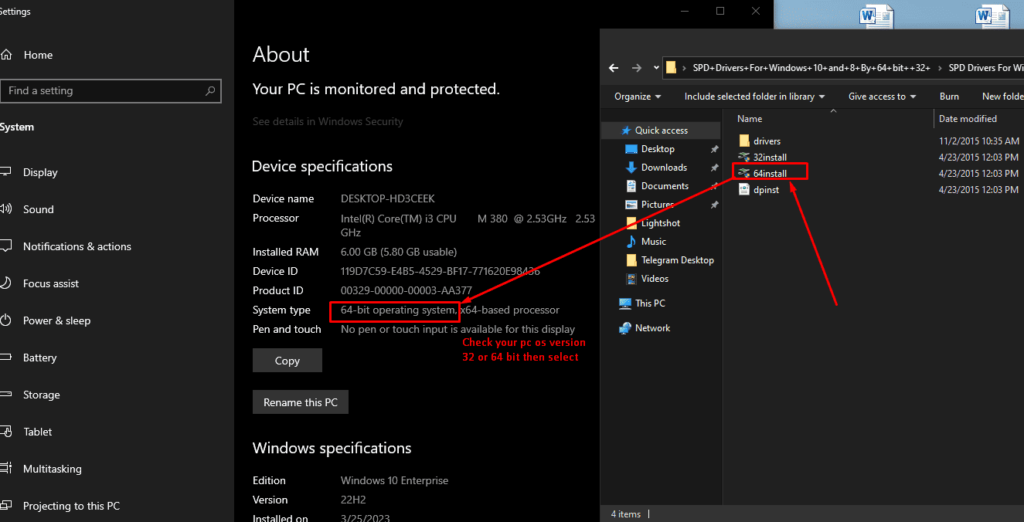
Step 3: Install the driver on your computer.

After extracting the files, you need to install on your computer. To do this, open the extracted folder and run the “64install” file. Follow the on-screen instructions to complete the installation process.
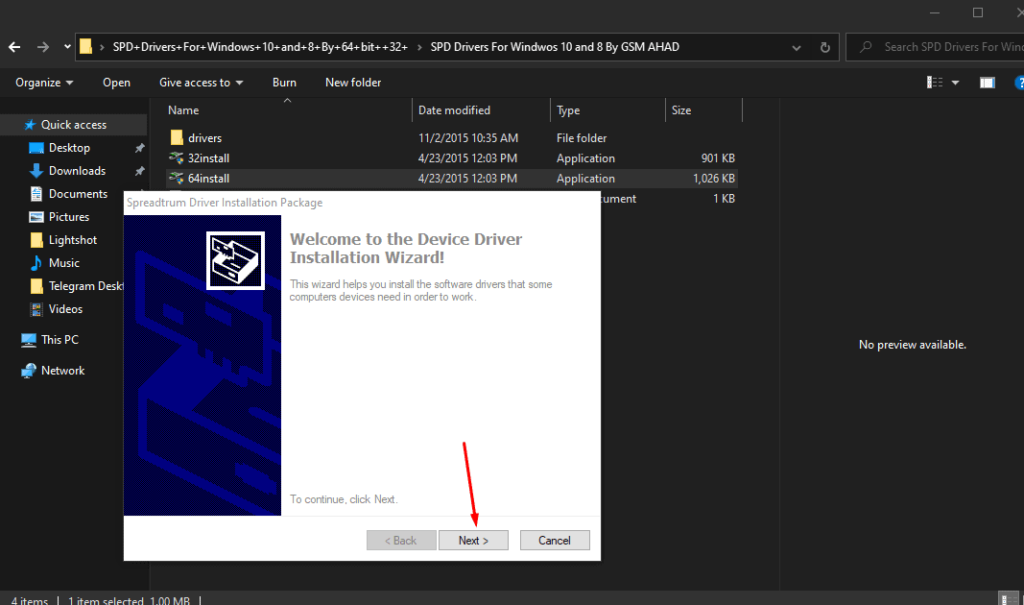
Step 4: Connect your SPD Android device to your computer.

Now that you have installed the SPD Android driver on your computer, it’s time to connect your device. Use a USB cable to connect your SPD Android device to your computer. Make sure that your device is turned on and unlocked.

Step 5: After finish the installation is complete, restart your PC to apply the changes.
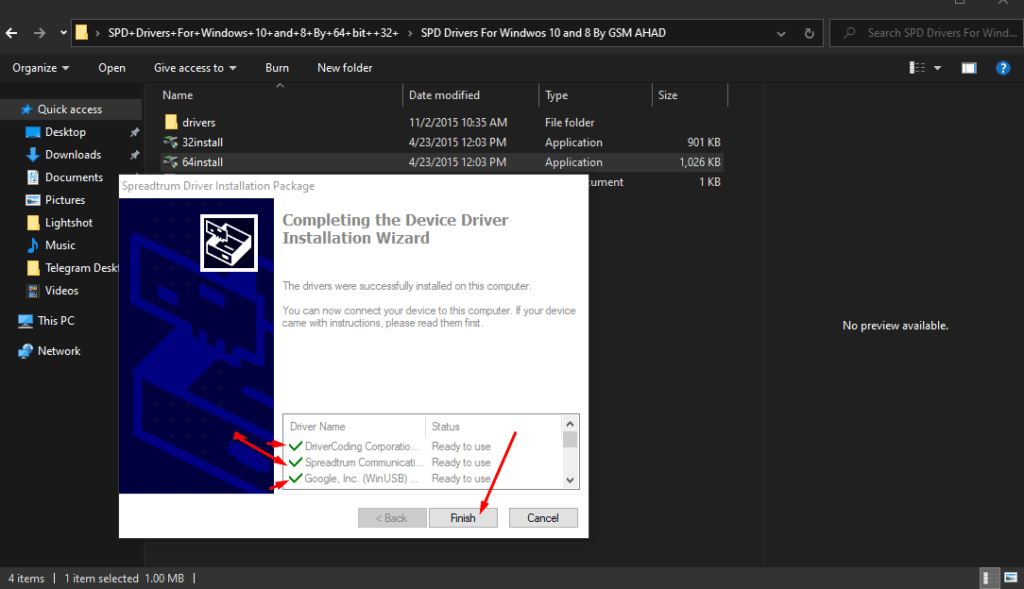
step 6: Verify the driver installation.

Once you have connected your device, your computer should automatically recognize it and install the necessary drivers. To verify that the Spreadthurmdriver installation was successful, open the Device Manager on your computer and look for your SPD Android device. If you see it listed without any warning signs or errors, then the driver installation was successful.

How to Download

Download the Android USB Driver here

File size

Download SCI Android Driver here

File size

Conclusion

The SPD Android driver is an essential component for connecting your Spreadthurm-based Android device to your PC. Installing the driver is a straightforward process that can be completed in a few minutes.


Tags: SPD Android driver
Share55Tweet35Share
Previous Post

The Ultimate Guide to MTK Android Driver

Next Post

Infinity CM2MT2 Dongle Setup File v2.43 | Download

Getasew

Getasew

Welcome to my website, my name is Getasew Yitayih and I am from Ethiopia. If you visit my website you get all electronic device maintenance tutorials, tech news, the latest firmware, flashing and unlocking tools, free crack tools, and more technological news.

Related Posts

Samsung usb driver
DRIVERS

Samsung Drivers: Downloading and Installing

by Getasew
May 13, 2023
0
793

Introduction Samsung USB drivers are essential software components that allow your mobile device to communicate...

Read more
mtk driver webp
DRIVERS

The Ultimate Guide to MTK Android Driver

by Getasew
May 4, 2023
0
354

Introduction: If you own an Android device with an MTK chipset, you may need to...

Read more
Next Post
cm2 dongle setup

Infinity CM2MT2 Dongle Setup File v2.43 | Download

Windows 10 png

Windows 10: The Ultimate Operating System

Leave a Reply Cancel reply

Your email address will not be published. Required fields are marked *

I agree to the Terms & Conditions and Privacy Policy.

Ads

Recent Post

cryptocurrency market in Ethiopia

Ethio crypto news

August 4, 2024
Cryptocurrency and Social Impact

Cryptocurrency and Social Impact: How Blockchain Technology is Driving Change

February 18, 2024
Car Insurance Coverage

Different Types of Car Insurance Coverage: A Comprehensive Guide

January 19, 2024

Social

Follow Us

Facebook Twitter Youtube Telegram
Yegna Elecom

What mean Yegna Elecom? Yegna means “ours” Ethiopian Amharic word and “Elecom” means “Electronic Computer” or “Electronic Computing”. Thus yegna elecom meaning “our electronics computing” or “our electronic computer”.

Categories

  • All crack tools
  • DRIVERS
  • Infinity CM2 Dongle
  • Infinix Firmware
  • Itel Firmware
  • Lifetime free tools
  • Miracle Box Setup
  • MOBILE FIRMWARE
  • PC OS
  • SMART Phone Driver
  • Smartphone Files
  • Software
  • TechBlog
  • Tecno Firmware
  • TOOLS
  • WINDOWS
ADVERTISEMENT

Recent News

cryptocurrency market in Ethiopia

Ethio crypto news

August 4, 2024
Cryptocurrency and Social Impact

Cryptocurrency and Social Impact: How Blockchain Technology is Driving Change

February 18, 2024
  • About Us
  • Privacy & Policy
  • Contact Us

Copyright 2023 © Designed By Getasew Yitayih (yegna elecom), All Rights Reserved.

No Result
View All Result
  • Home
  • WINDOWS
    • PC OS
    • Office Tools
    • PC Drivers
    • Antivirus
    • Software
    • Power geez
  • Box & Dongle
  • TOOLS
    • All Pro Free tools
    • Lifetime free tools
  • DRIVERS
    • Keypad phone driver
    • SMART Phone Driver
    • Box|Dongle Driver
  • FIRMWARE
    • Keypad Phone Files
    • SmartPhone File
    • DA Files
  • FRP BYPASS
  • BLOG
  • MORE
    • Tutorials
    • Request For Your Software
    • Buy ME A Coffee

Copyright 2023 © Designed By Getasew Yitayih (yegna elecom), All Rights Reserved.

This website uses cookies. By continuing to use this website you are giving consent to cookies being used. Visit our Privacy and Cookie Policy.